My work email has been getting a fair amount of phishing attempts lately. They're all impersonations of American banks, and I'm not a customer of any.
No spam mail ever ends up in my inbox, but I sometimes check my spam folder just for the fun of it.
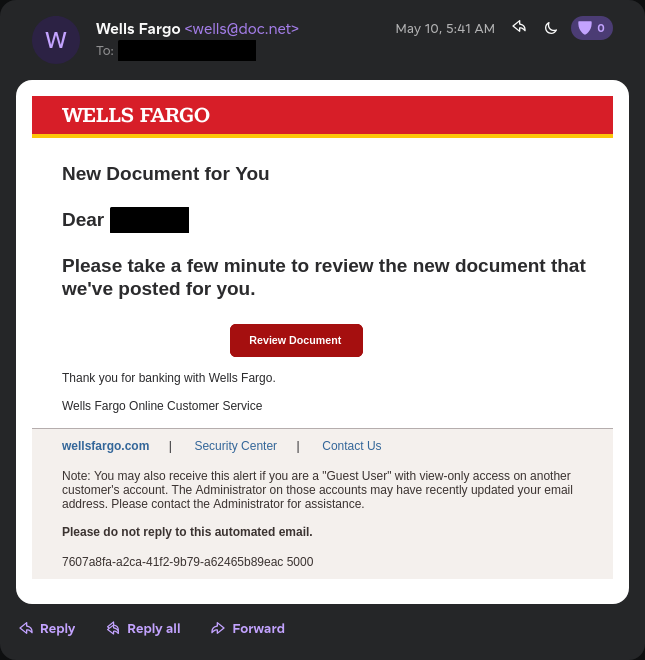
This is what we're working with today.
It's impersonating Wells Fargo. What caught my eye is that it comes from @doc.net. Usually, they come from a Gmail address. I have not looked into the domain much, but I'd assume they're either part of this attack or they were compromised.
The Email
To be fair, the email itself is pretty phishing-y, and I'm sure I don't have to explain myself. There's nothing sophisticated about it. If anything, they made a spelling mistake in the last line:
Please take a few minute to review the new document that we've posted for you.
The footer links also do nothing. They are <a> tags but don't have a href attribute, so they're just text practically.
First Stage
The button points to https://surgery.nadqa.nadsoft.co/wx.htm.
Initially I thought it would return a fake login page, but instead it redirected me immediately to another webpage. It wasn't an HTTP redirect though, they used a meta refresh tag:
<meta
  http-equiv="refresh"
  content="0.1;URL=https://surgery.nadqa.nadsoft.co/1frexpv/buk.html"
/>
I'm not sure why they did this instead of a normal redirect, but it could be to bypass some sort of security filter? Or maybe they just wanted to add an extra step to make it look more legitimate.
Second Stage
This is the reason I wanted to write about this. It's a little interesting.
<!-- https://surgery.nadqa.nadsoft.co/1frexpv/buk.html -->
<!DOCTYPE html>
<html>
  <head>
    <script src="https://code.jquery.com/jquery-3.6.0.min.js"></script>
    <script>
      $(document).ready(function () {
        saveFile();
      });
      function saveFile(name, type, data) {
        if (data != null && navigator.msSaveBlob)
          return navigator.msSaveBlob(new Blob([data], { type: type }), name);
        var a = $("<a style='display: none;'/>");
        var encodedStringAtoB = "PCFET0NUWVBFIGh0bWw...";
        var decodedStringAtoB = atob(encodedStringAtoB);
        const myBlob = new Blob([decodedStringAtoB], { type: "text/html" });
        const url = window.URL.createObjectURL(myBlob);
        a.attr("href", url);
        $("body").append(a);
        a[0].click();
        window.URL.revokeObjectURL(url);
        a.remove();
      }
    </script>
  </head>
  <body>
    <!-- Your HTML content goes here -->
  </body>
</html>
Instead of serving HTML directly, it embeds a huge Base64 string in the client-side JS:
var encodedStringAtoB = "PCFET0NUWVBFIGh0bWw...";
Then decodes it on page load:
var decodedStringAtoB = atob(encodedStringAtoB);
const myBlob = new Blob([decodedStringAtoB], {
  type: "text/html",
});
const url = window.URL.createObjectURL(myBlob);
And finally navigates to it:
a[0].click();
Also pretty sure they vibecoded the entire thing, cause no human being would write:
<!-- Your HTML content goes here -->
blob: URLs
The browser generates a blob: URL that points to in-memory content. Therefore, the actual phishing form only exists in memory inside the browser.
Instead of https://example.com/login.html, the URL becomes blob:https://example.com/550e8400-e29b-41d4-a716-446655440000.
This is an advantage for the attacker because it allows them to serve the phishing page without ever hosting it as a static resource on the server. The entire page is constructed in the browser, which probably helps evade security filters that look for known phishing URLs.
It also makes it much more complex to debug the phishing page since it requires decoding.
The Phishing Page
Admittedly, I forgot to take screenshots of the phishing page. But I did note down the network requests.
To observe behavior, I submitted fake credentials that do not correspond to a Wells Fargo account:
Content-Disposition: form-data; name="user"
jsmith

Content-Disposition: form-data; name="pass"
jsmith123
The server responded with:
{ "success": "sent cc" }
After that, it started sending a POST request to https://surgery.nadqa.nadsoft.co/1frexpv/surgery//panel.php every second, and it always responded with:
{ "error": "Not found", "ip": "23.234.72.56", "msg": "error" }
On the 10th attempt, it responded with:
{ "msg": "invaliduser" }
I have absolutely no idea how it works behind the scenes. My guess is that the server validates the provided credentials with Wells Fargo.
Closing Thoughts
Turns out there was no new document for me to review. Not from Wells Fargo at least.
And despite all the effort, the weakest part was still the spelling mistakes in the email. But at least they tried.